
Have you ever wanted to dive into machine learning, but felt intimidated by all the jargon, setup, and installation nightmares? Fear not! Today, we’ll take a hands-on, fun approach to neural networks using Google Colab — no local installs, no complicated setups, just you, your browser, and some flowers. 🌸
Why Google Colab? Because everything is within our reach. Google Colab is like a paradise for TensorFlow projects.
- Free GPU/CPU access.
- Pre-installed Python libraries like TensorFlow.
- Shareable notebooks like Google Docs.
- Works on any device, even your phone (well, almost 😉).
To run neural networks, first of all, we need to have train data. As a start, we will use this Iris as training dataset. The Iris dataset is a classic in ML tutorials. It has 150 flowers, 3 species, and 4 measurements per flower:
- Sepal length & width
- Petal length & width
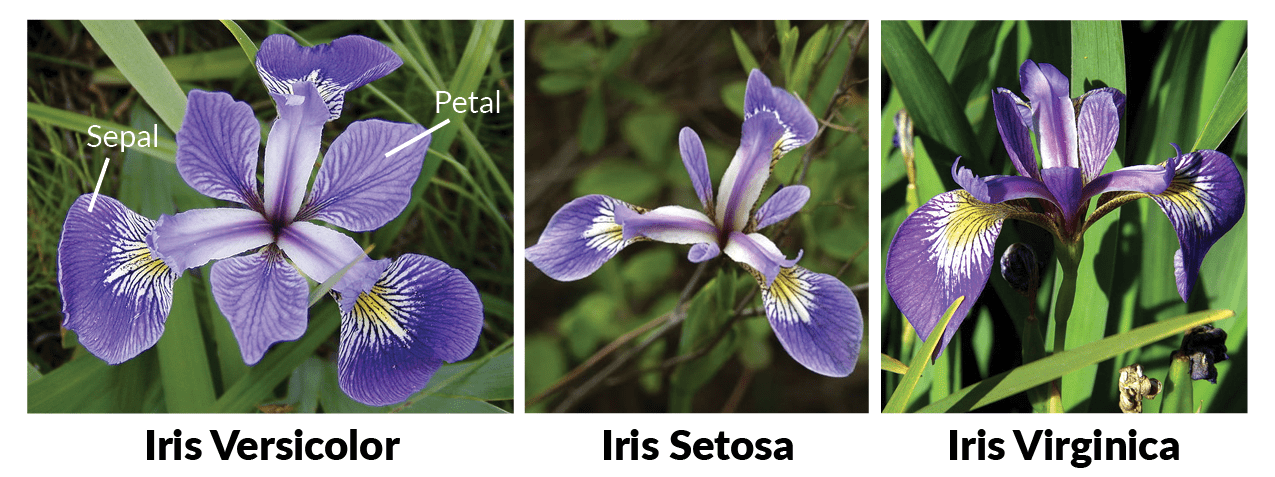
There are 3 types of iris flower available which are Virginica, Setosa and Versicolor.
Our goal: teach a computer to identify the species from these measurements. Sounds like magic? That’s a neural network for you! Let’s start.
First, open the IDE on local device and open a new file. Let’s call it neural-network-iris.ipynb. Add this JSON file, and I will explain it further. Google Colab works in cell blocks. Each block can be run separately.
Install required packages cell blocks
The first block is to specifically install required package in order to run TensorFlow, neural networks and at the same time, plot graph to show Accuracy and Loss .
!pip install pandas numpy tensorflow scikit-learn matplotlib
Import required packages and upload the training dataset JSON file
Next, let’s import required packages and the training dataset. Upon running this, you will be prompt to upload the iris.json file. It is a good idea to copy the training data and paste it somewhere, easier place to find for uploads later.
import json
import numpy as np
import tensorflow as tf
from tensorflow.keras.models import Sequential
from tensorflow.keras.layers import Dense
from sklearn.preprocessing import LabelBinarizer
from sklearn.model_selection import train_test_split
import matplotlib.pyplot as plt

# Upload iris.json
from google.colab import files
uploaded = files.upload()  # Upload iris.json

# Upon running this cell, a file upload will prompted. Upload the testing dataset.
Load dataset
Next, let’s load the dataset and put in in an array. This array will be encode and later split into training sets and testing sets.
Training Set
- Used by the neural network to learn patterns.
- The network updates weights to minimize loss (error) on these examples.
- Think of it like “practice problems” in school.
Testing Set (or Validation Set)
- Used to evaluate performance after training.
- The network never sees these examples during training.
- It tells you how well your network can generalize to new, unseen data.
- Think of it like the exam after studying — it measures real understanding.
# Load the JSON file
iris_data = json.load(open('iris.json'))

# Convert to numpy arrays
X = np.array([[item['sepal_length'], item['sepal_width'], item['petal_length'], item['petal_width']] for item in iris_data])
y_raw = [item['species'] for item in iris_data]

# One-hot encode the labels
encoder = LabelBinarizer()
y = encoder.fit_transform(y_raw)

# Split into training and testing sets (80/20)
X_train, X_test, y_train, y_test = train_test_split(X, y, test_size=0.2, random_state=42, stratify=y)
Build a neural network model
After setting up the training and testing datasets, let’s start working on building the neural network model. Import Sequential from tensorflow.keras.models .
Sequential is a type of neural network in Keras/TensorFlow where layers are stacked one after another. Think of it like a layered cake, data flows from the input layer → hidden layers → output layer in sequence. Each layer transforms the data a little bit.
Dense layer is a fully connected layer. Every neuron connects to every neuron in the previous layer. So, in this chunk, we have built 3 different layers with a different number of neurons in each layer, 5, 3, 3. For this example, we use activation sigmoid. sigmoid ensures neuron output is squashed between 0 and 1. The higher the number, the better.
input_shape=(4,) means the layer expects 4 input features per sample. In Iris dataset, these are: sepal length, sepal width, petal length, petal width.
Lastly, we compile it with Adam optimizer. Optimizer is how the network updates its “weights” during training. Adam (Adaptive Moment Estimation) is a popular optimizer that:
- Automatically adjusts learning rates for each parameter.
- Combines advantages of Momentum and RMSProp.
For loss, its how the network measures how wrong it is. categorical-crossentropy is standard for multi-class classification, where each example belongs to one of several classes (ie: Setosa, Versicolor, Virginica).
Metrics are extra additional values you want to track during training, usually for monitoring. Here, accuracy measures what fraction of predictions match the true label. Unlike loss, metrics are not used for training, just for evaluating performance.
# Build the neural network
model = Sequential([
    Dense(5, input_shape=(4,), activation='sigmoid'),
    Dense(3, activation='sigmoid'),
    Dense(3, activation='sigmoid')
])

# Compile the model using categorical_crossentropy for classification
model.compile(
    optimizer=tf.keras.optimizers.Adam(learning_rate=0.06),
    loss='categorical_crossentropy',
    metrics=['accuracy']
)
The best part, train the model
Next, we are ready to train the model. The model is using the Sequential package and calling the fit function. It tells the model: “Here’s your training data — learn from it!”.
X_train is the measurements of the flowers (sepal/petal lengths and widths), while y_train is one-hot encoded species labels (Setosa, Versicolor, Virginica). These are the examples the network uses to learn patterns.
Epoch is one complete pass through the entire training dataset. Hence, 100 epochs means the network sees all training samples 100 times, adjusting weights each time.More epochs means network has more chances to learn, however, too much epoch counts can risk of overfitting. Hence, let’s set it to 100 for this example. That should be enough.
# Train the model
history = model.fit(
    X_train, y_train,
    epochs=100,
    verbose=1,
    validation_data=(X_test, y_test)
)
Plotting the charts
In order to view the accuracy and loss, we need to plot the charts properly. Charts can be plotted with matplotlib.pyplot . Let’s plot 2 different charts Model Accuracy and Model Loss. On each chart, let’s use Epoch as the X label and Accuracy and Loss for Y label. Also the plot label will be Train Accuracy and Train Loss, also Validation Accuracy and Validation Loss.
# Plot training & validation accuracy and loss
plt.figure(figsize=(12,5))

plt.subplot(1,2,1)
plt.plot(history.history['accuracy'], label='Train Accuracy')
plt.plot(history.history['val_accuracy'], label='Validation Accuracy')
plt.title('Model Accuracy')
plt.xlabel('Epoch')
plt.ylabel('Accuracy')
plt.legend()

plt.subplot(1,2,2)
plt.plot(history.history['loss'], label='Train Loss')
plt.plot(history.history['val_loss'], label='Validation Loss')
plt.title('Model Loss')
plt.xlabel('Epoch')
plt.ylabel('Loss')
plt.legend()

plt.show()
Last but not least, let neural network do predictions
Let’s go step by step for this final part. This is where your network shows what it learned.
# Evaluate / Predict on testing set
predictions = model.predict(X_test)

print("Predictions (probabilities):")
print(predictions)

# Convert predictions to labels
predicted_labels = encoder.inverse_transform(np.round(predictions))
print("Predicted species:")
print(predicted_labels)

# Compare with actual labels
actual_labels = encoder.inverse_transform(y_test)
print("Actual species:")
print(actual_labels)
predict tells the trained model: “Here’s some new data, what do you think the labels are?” X_test is the features of flowers the model never saw during training. predictions returns a matrix of probabilities, one row per sample, one column per class. Example output for one flower (3 classes: Setosa, Versicolor, Virginica):
[0.98, 0.01, 0.01] # model thinks 98% chance it’s Setosa
Predictions Shows the raw probability outputs from the network. It is useful to see how confident the network is for each prediction.
np.round(predictions) converts probabilities into 0 or 1. Highest probability gets rounded to 1 (selected class). Next, encoder.inverse_transform converts one-hot encoded vectors back into species names.
Its time for the good stuff!
To run this properly, open Google Colab and import this file. Click File → Upload notebook → imports this ipynb file. Once uploaded, run the cells one by one, from top to bottom. Upon model training, you will see something like this.
Let’s examine.
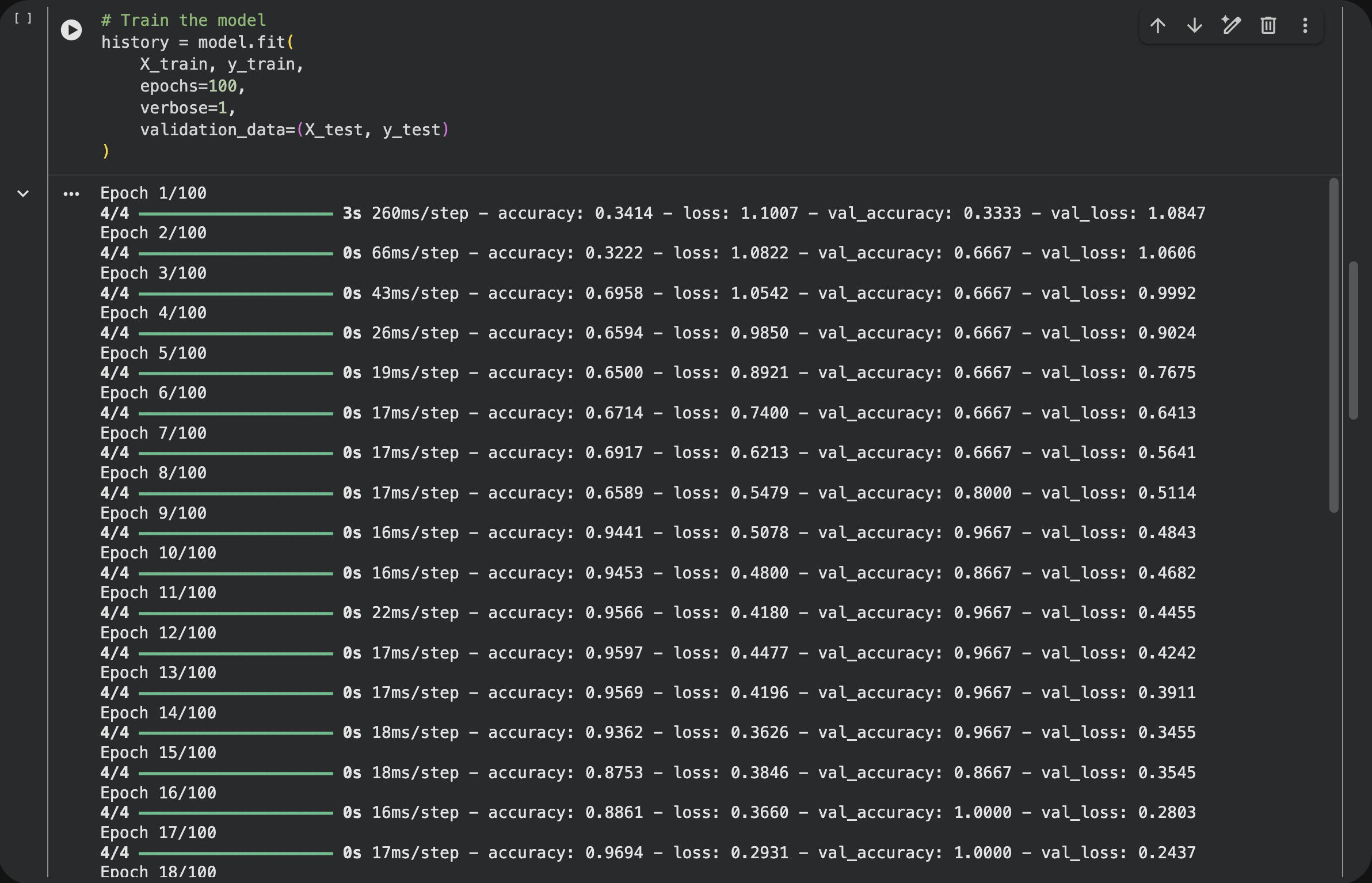
From 1th until 18th epochs, you can examine.
- On 1st epoch, the
accuracyis 0.34, thelossis 1(super high loss) - On 18th epoch, the
accuracyis 0.96, thelossis 0.2.
This means, upon each epoch iteration, the neural networks keeps learning and improving the accuracy, from time to time, at the same time, reducing the incorrectness ie loss. Thats good! Exactly what we expect.
Next, upon running the cell plot, you can see the graph for Accuracy and Loss. Let’s examine.
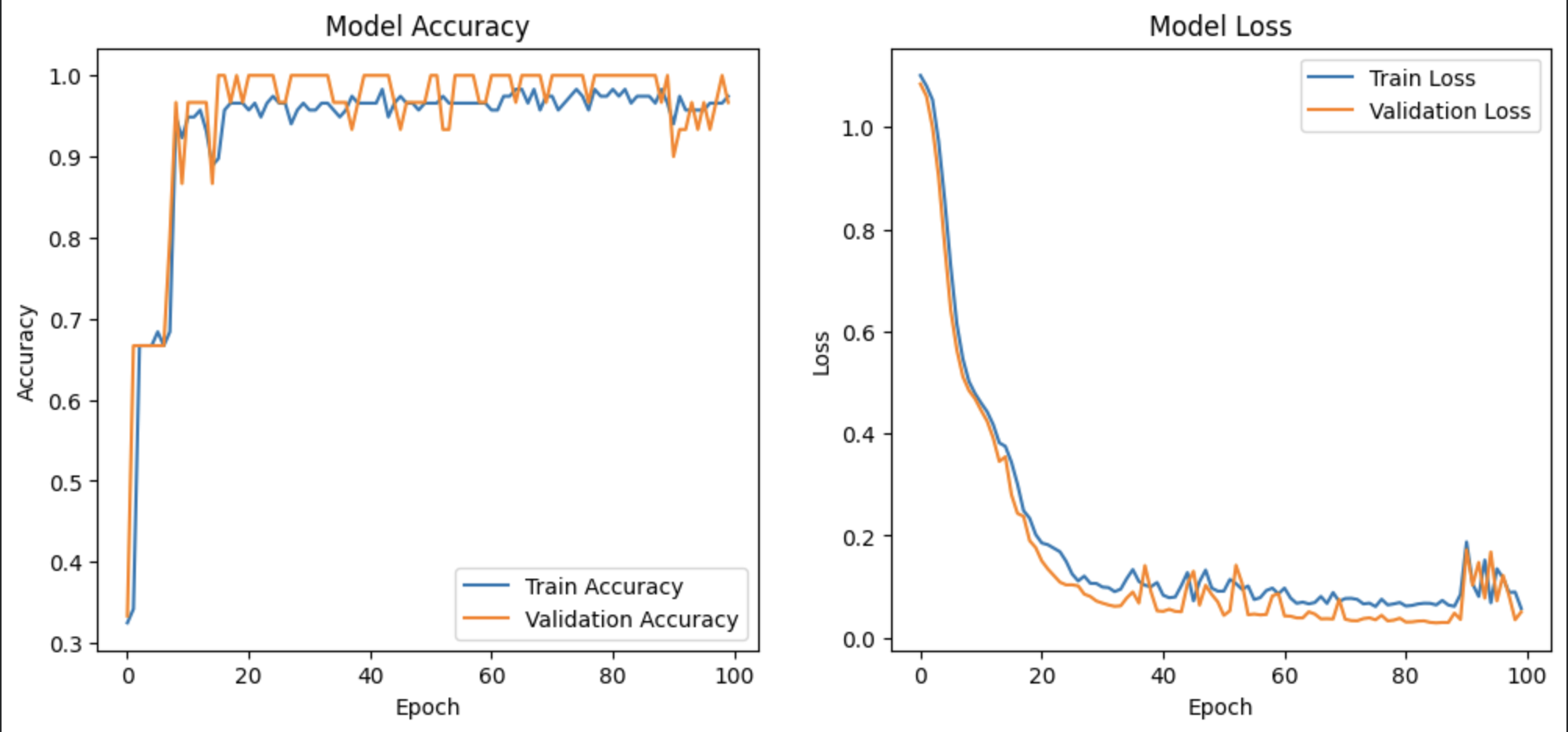
On Accuracy, the accuracy is super low at start on 1-10 epoch. On next 10-20 epoch, the accuracy is already near 1, highest accuracy ever will be. Similar to loss, on first 1-10 epoch, the loss is high but gradually reduces.
However, at the end of the epoch, around 90-100, there is a small spike of loss. This indicates that the epoch is too high, and causing overfitting. However, the number is still low and accuracy is still high. That should be ok for the sake of this experiment.
Lastly, let’s examine predictions.
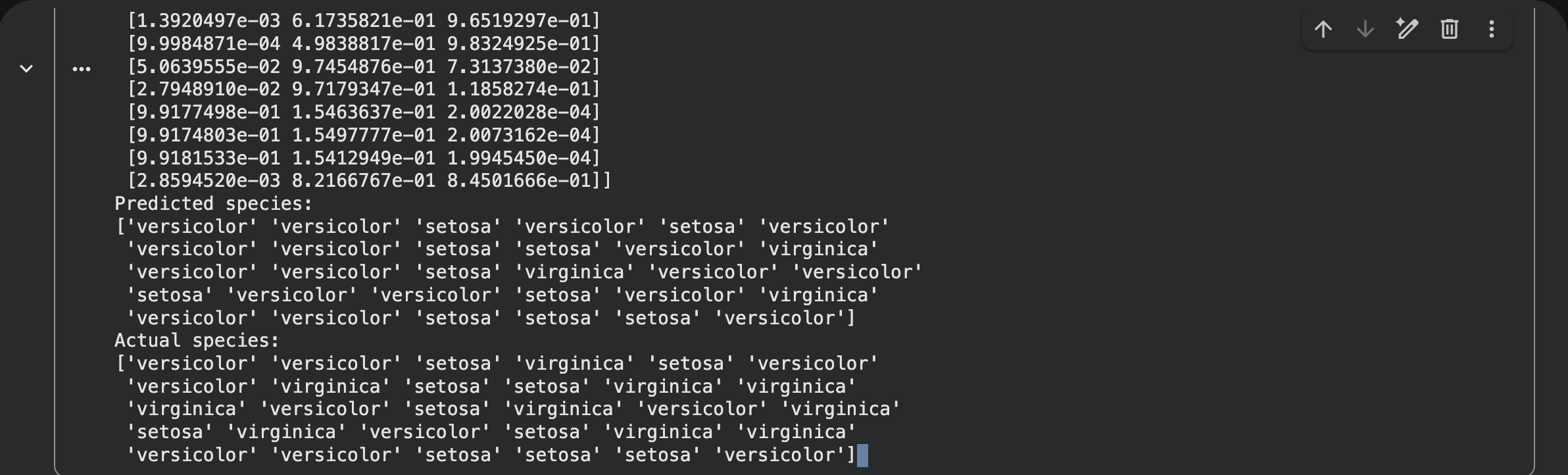
If you run the last cell, you can see the output of the code chunk. It will show something like this. First part is the neural networks predictions. Next is the actual species. If comparing between the predicted species into actual species, on this example, I can conclude that around 70% of the predictions is correct. That is quite good for our first try.
To improve predictions, there are several items that can be use.
- Change the activation layer into
softmaxorrelu - Increase the neuron numbers
- Use higher epoch, but integrate early stopping to stop automatically when validation loss stops improving.
- Apply smaller learning rate, try
learning_rate=0.01maybe?
Related links:
- iris.json = https://www.notion.so/iris-json-2d6dd4149dba80c0ae97ebe646f9c097?source=copy_link
- neural-network-iris.ipynb = https://www.notion.so/neural-network-iris-ipynb-2d6dd4149dba8065923df276b8bf26f6?source=copy_link
That’s is for now Happy coding all😄💻.
Written with love by Arif Mustaffa
Back to blog page